Ableton/Live/UG/29 Audio Effect Reference/20 Gate
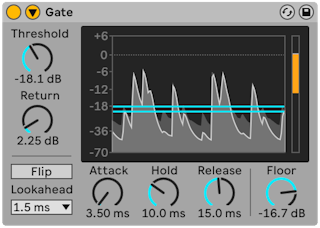
- Gate passes only signal above a threshold. It removes noise between sounds, such as hiss or hum, or shapes sounds by cutting off reverb or delay tails and natural decays.
- The display shows input in light gray and output in darker gray with a white outline, so the gating can be seen.
- Threshold — sensitivity; a blue line in the display that can be dragged
- Return (hysteresis) — gap between the opening level and the closing level, shown as an orange line. More return stops the gate chattering open and shut near the threshold.
- Flip — reverses the gate so only signal below the threshold passes
- Lookahead — 0, 1 or 10 ms of delay so the gate can open on time
- Attack — time to open; very short can click, long softens the attack
- Hold — time the gate stays open after the signal falls below the threshold; then Release sets how long it takes to close
- Floor — how much a closed gate turns the signal down; −∞ dB mutes, 0 dB does nothing
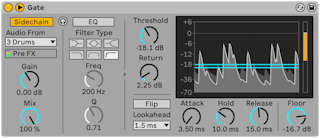
- Sidechain: the title bar button unfolds it.

- Sidechain on — another track's signal opens the gate. Gain sets the trigger level (never heard); Dry/Wet mixes sidechain and own signal as the trigger.
- Example: put Gate on a held pad and use a drum loop as the sidechain, so the pad plays in the drums' rhythm.
- The sidechain EQ on the right triggers from one frequency band.
- The headphones button plays only the sidechain signal, and the display shows its level in green.