Ableton/Live/UG/29 Audio Effect Reference/19 Filter Delay
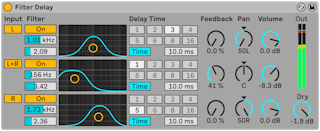
- Filter Delay has three delay lines, each behind its own linked low-pass and high-pass filters, so only part of the spectrum is delayed. Feedback also runs back through the filters.
- Delay 1 takes the left input, delay 2 both channels, delay 3 the right. Each outputs on its source channel unless its Pan control overrides it. Each delay can be switched on and off.
- Each filter has an On switch and an X-Y controller: horizontal sets frequency, vertical sets bandwidth.
- Sync on — delay in sixteenths from numbered buttons (4 is one beat); the Delay Time percentage nudges it for swing. Sync off — delay in ms, dragged or typed.
- Feedback — output fed back into each delay; very high values can run away into loud oscillation, so protect ears and speakers.
- Volume per delay, up to +6 dB, makes up for heavy filtering.
- Dry — dry level; set to minimum on a return track