Ableton/Live/UG/29 Audio Effect Reference/18 External Audio Effect
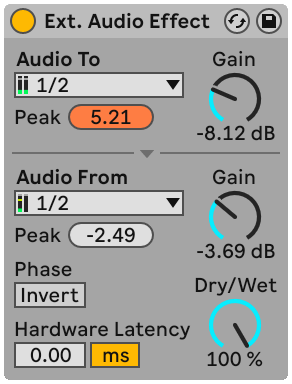
- External Audio Effect brings a hardware effects unit into a track's device chain.
- Audio To — audio interface outputs feeding the hardware; Audio From — inputs bringing it back. "Configure…" at the bottom of each chooser opens the Audio Settings.
- Peak indicators under each chooser hold the highest level; click to reset.
- Gain knobs — send and return levels; set them to avoid clipping in the hardware and on the way back in
- Dry/Wet — set to 100% on a return track
- Invert — flips the phase of the returning signal
- Hardware Latency — manual compensation for the hardware's delay, which Live cannot detect.
- Use samples for digital connections, so the value holds when the sample rate changes; use ms for analog connections.
- Samples are finer, so analog setups can be fine-tuned in samples — then switch back to ms before changing sample rate.
- Disabled when Delay Compensation is off in the Options menu.
- The Knowledge Base article "Driver Error Compensation FAQ" explains how to measure it.