Ableton/Live/UG/29 Audio Effect Reference/15 EQ Eight
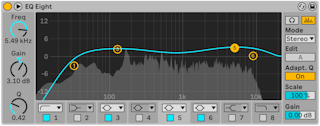
- EQ Eight has up to eight parametric filters per channel.
- Modes:
- Stereo — one curve for both channels
- L/R — separate curves for left and right
- M/S — separate curves for mid and side
- In L/R and M/S both curves are drawn, but only the one chosen with Edit can be changed.
- Each band's chooser offers, top to bottom: low cut (48 or 12 dB/octave), low shelf, peak, notch, high shelf, high cut (12 or 48 dB/octave). Each band has an on/off switch; turn unused bands off to save CPU. Stacking identical bands gives very steep filtering.
- Editing:
- drag a dot: sideways for frequency, up and down for gain;
Option-drag (Mac) or Alt-drag (Windows) for Q - for low cut, notch and high cut, vertical dragging sets Q, since they have no gain
- drag a box around several dots to move them together, with the mouse or arrow keys
- or click near a band's number and use Freq, Gain and Q
- The title bar button moves the display into Live's main window, where all eight bands can be edited at once.
- Analyze — shows the output spectrum behind the curves; turn it off to work by ear
- Adaptive Q — Q rises with the amount of boost or cut, like classic analog EQs, for steadier output level
- Audition (headphone icon) — click and hold a dot to hear only that band
- Gain — overall output level
- Scale — scales the gain of every band that has gain
- Oversampling — processes at twice the sample rate for smoother behavior at high frequencies, for slightly more CPU
