Ableton/Live/UG/29 Audio Effect Reference/12 Drum Buss
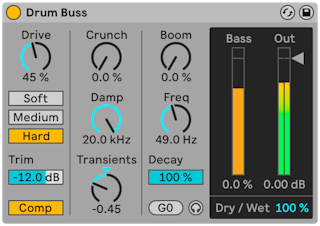
- Drum Buss is an analog-style processor for adding body and character to a group of drums and holding them together in a mix.
- Trim — lowers the input before processing
- Comp — a fixed compressor before the distortion, tuned for drum groups: fast attack, medium release, moderate ratio, plenty of makeup gain
- Distortion types, increasingly strong:
- Soft — waveshaping
- Medium — limiting
- Hard — clipping with a bass boost
- Drive — how hard the input hits the distortion
- For clarity and presence on snares and hats.
- Crunch — sine-shaped distortion on the mid-highs
- Damp — low-pass filter to remove harsh highs after distortion
- Transients — above 100 Hz: positive values add attack and sustain for a fuller, punchier sound; negative values add attack but cut sustain for tighter, drier drums
- A resonant filter that strongly boosts the bass, plus a decay control.
- Boom — amount of low-end boost; the Bass Meter shows it even when it is hard to hear
- Freq — frequency of the boost; Force To Note snaps it to the nearest MIDI note
- Decay — how fast the lows decay. At Boom 0% it affects only the incoming (post-distortion) signal; above 0% it also affects the boost.
- Boom Audition (headphone icon) — solos the low-end boost
- Dry/Wet — balance of processed and dry signal
- Output Gain — output level