Ableton/Live/UG/29 Audio Effect Reference/05 Beat Repeat
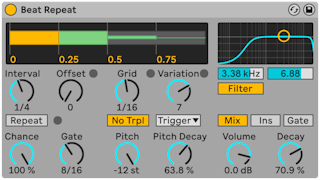
- Beat Repeat captures slices of the incoming audio and repeats them, on a schedule or at random.
- When to repeat:
- Interval — how often new material is captured, synced from 1/32 to 4 bars
- Offset — moves that point later; Interval 1 Bar with Offset 8/16 captures on beat three of each bar
- Chance — probability that a scheduled repeat happens; 100% always, 0% never
- Gate — total length of the repeats in sixteenths; 4/16 lasts one beat
- Repeat — ignores the above and repeats right away until switched off
- What repeats:
- Grid — slice length; large values give rhythmic loops, small ones give glitchy artifacts. No Triplets keeps the grid binary.
- Variation — randomizes the grid size around Grid. Its mode sets when: Trigger (each time repeats start), 1/4, 1/8, 1/16 (at regular intervals) or Auto (after every repeat, the most varied).
- Pitch — lowers the repeats by resampling, which also stretches them, so high values blur the rhythm. Pitch Decay makes each repeat lower than the last; the manual calls it the most obscure control in the device.
- Filter — a combined low-pass and high-pass with center frequency and width
- Mix mode:
- Mix — original plus repeats
- Insert — original muted while repeats play
- Gate — repeats only; suits a return track
- Volume sets the output and Decay fades successive repeats.