Ableton/Live/UG/29 Audio Effect Reference/04 Auto Shift
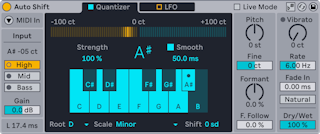
- Auto Shift tracks and corrects pitch in real time, with vibrato, pitch shifting and formant shifting. Built mainly for vocals, it works on any monophonic audio. It corrects to a scale or to MIDI notes from another track, and has its own LFO.
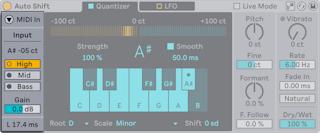
- Auto Shift takes both audio and MIDI input.
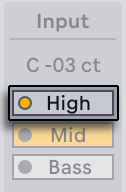
- Input Pitch shows the detected pitch in notes and cents.
- Pitch Range — High, Mid or Bass, to match the source; each has an LED that lights when the input falls in its range. Each range has a different latency.
- Input Gain — −24 to +24 dB
- The Latency Readout shows latency in ms. Live Mode in the title bar lowers latency for performance, at the cost of small glitches at note starts and fast pitch changes.
- MIDI input corrects pitch to notes from another MIDI track instead of to a scale.
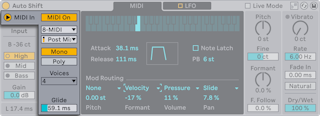
- MIDI In shows the MIDI Input panel; MIDI On turns MIDI input on and swaps the Quantizer tab for the MIDI tab.
- External Source picks the track; Tapping Point takes the notes before (Pre FX) or after (Post FX, Post Mixer) that track's MIDI effects.
- Voice mode:
- Mono — one note at a time; Glide sets how long overlapping notes take to slide
- Poly — up to 2, 4 or 8 voices (Voice Count), for harmonies
- With MIDI input on, Auto Shift is silent unless notes arrive.
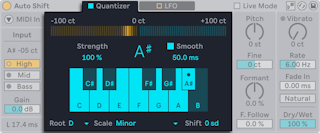
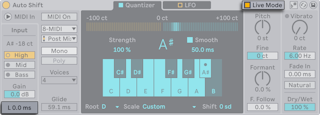
- The Quantizer corrects pitch to the notes of a scale.
- Pitch Correction Meter — how far, in cents, the input is being moved, with the target note below it
- Correction Strength — how hard pitch is pulled to the target
- Smooth and Smoothing Time (0–200 ms) — smooth transitions between notes and keep natural vibrato. Together with Correction Strength they range from subtle to hard, stepped correction.
- Included Notes in Scale — click notes to build a scale, or use Root and Scale
- Pitch Shift — transposes by scale degrees after correction
- Use Current Scale in the title bar follows the clip's scale, shows its notes in purple, and disables Root and Scale.
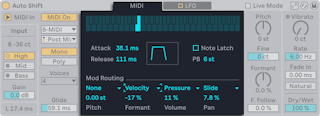
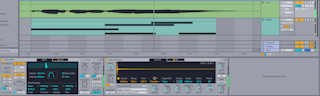
- The MIDI tab replaces the Quantizer tab when MIDI input is on. A keyboard shows the notes arriving from the source track.
- Scale awareness is off with MIDI input. To keep notes in a scale, put a Ableton/Live/UG/30 MIDI Effect Reference/07 Scale effect on the source track and set Tapping Point to Post FX or Post Mixer.
- Attack Time (0–1000 ms) and Release Time (0–5 s) shape each note's envelope.
- Note Latch — holds each note until the next Note On
- Pitch Bend Range — 0 to 48 semitones
- Mod Routing — Pitch, Formant, Volume and Pan can each take one source (Velocity, Pressure, Mod Wheel, Pitch Bend, Note PB, Slide) with its own Mod Depth.
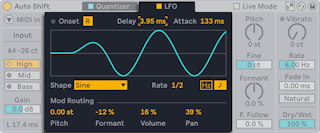
- The built-in LFO modulates pitch, formants, volume and pan, whether or not correction is active.
- LFO Reset — restarts the LFO at each onset. With the Quantizer, an onset is pitched audio after unpitched audio; with MIDI input, a new note. An indicator LED flashes on each restart.
- LFO Delay (0–1.5 s) and LFO Attack (0–2 s) delay the LFO and fade it in.
- LFO Waveform — Sine, Triangle, Triangle 8, Triangle 16, Saw Up, Saw Down, Rectangle, Random, Random S&H
- LFO Rate — in ms or synced divisions (LFO Sync)
- Mod Routing — separate depth for Pitch, Formant, Volume and Pan
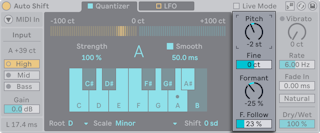
- Pitch Shift — transposition in semitones; Pitch Shift Fine in cents
- Formant Shift — −100% to 100%. Formants are the resonances that give a sound its character; shifting them makes a voice sound higher or lower without changing its pitch.
- Formant Follow — how much the formants move with the pitch shift; more sounds more natural
- These work with or without pitch correction.
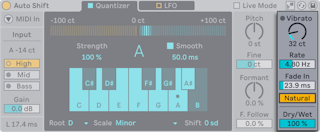
- Vibrato Amount — 0 to 200 cents
- Vibrato Rate — 2 to 15 Hz
- Vibrato Fade In — fade-in time in ms
- Natural Vibrato — varies speed and depth for a more realistic vibrato
- Vibrato works with or without pitch correction.
- Dry/Wet — 0% is uncorrected, 100% only corrected; 50% gives a doubling effect.