Ableton/Live/UG/29 Audio Effect Reference/02 Auto Filter/07 Sidechain Parameters
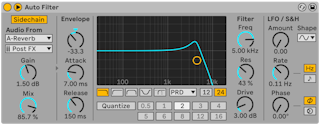

- By default the envelope follower listens to Auto Filter's own input. The Sidechain Section toggle at the top left opens external sidechain controls.
- External turns on the external sidechain; External Source picks the source and External Tapping Point picks Pre FX, Post FX or Post Mixer.
- Mix — 0% uses only the internal signal, 100% only the external one
- SC Gain — sidechain input level; it only affects triggering, not volume
- Sidechain Listen — replaces the output with the sidechain signal for monitoring
- SC Filter limits the sidechain to a frequency range, so Auto Filter reacts only to it.
- Sidechain Filter Frequency sets the cutoff; Type is low-shelf, peak, high-shelf, low-pass, band-pass or high-pass.
- Shelves boost or cut on one side of the cutoff to a level set by Shelf Gain; peak boosts or cuts around the cutoff by Peak Gain.
- Sidechain Filter Q sets the bandwidth.
- The sidechain is summed to mono by default, so both channels get the same envelope. Mono Sidechain in the device's context menu turns that off.