Ableton/Live/UG/29 Audio Effect Reference/02 Auto Filter/02 Filter Display
29.2.2 Filter Display
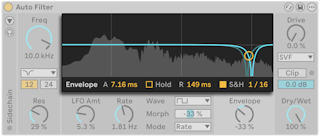
- The center display shows the filter curve, the modulated curves for left and right, and a live spectrum of the output. Dragging the handle sets Freq and Res (Pitch and Formant for Vowel).
- Below the display are the LFO controls and the Envelope control. Selecting either shows its extra parameters at the bottom of the display.