Ableton/Live/UG/29 Audio Effect Reference/02 Auto Filter
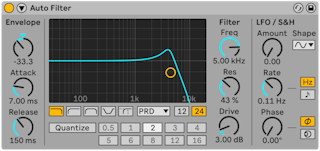
- Auto Filter applies a choice of filter types and analog-modeled filter circuits, moved by an LFO and an envelope follower. The envelope follower can track the filtered signal or an external sidechain.
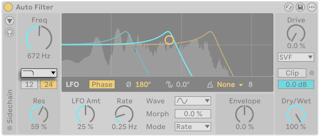
- Filter Type offers ten filters:
- Low-pass — cuts above the cutoff; 12 or 24 dB slope
- High-pass — cuts below the cutoff; 12 or 24 dB
- Band-pass — passes a band around the cutoff; 12 or 24 dB
- Notch — cuts a narrow band; 12 or 24 dB
- Morph — sweeps from low-pass through band-pass to high-pass; 6, 12, 24 or 48 dB
- DJ — one bipolar control: above zero removes lows, below zero removes highs, with resonance rising toward ±100%
- Comb — a series of peaks or notches across the spectrum; flanger-like when modulated
- Resampling — resamples at a rate set by the cutoff, giving aliasing and degradation
- Notch + LP — a notch plus a low-pass roll-off; 12 or 24 dB
- Vowel — emphasizes formants so the sound resembles a voice
- Freq sets the cutoff. The DJ filter has Control instead; Vowel has Pitch, which shifts the formants in semitones.
- Res sets emphasis at the cutoff; it does nothing on Resampling. Vowel has Formant instead, moving through the vowels a, e, i, o, u.
- Morph, on Morph, Comb, Notch + LP and Vowel:
- Morph filter — low values low-pass, middle band-pass, high values high-pass
- Comb — from peaks (low) to notches (high) at multiples of the cutoff
- Notch + LP — moves the notch closer to the low-pass cutoff as the value rises, reaching it at 100%
- Vowel — increasingly evens out the formant gains
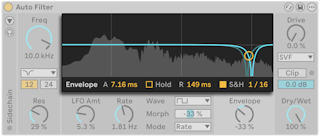
- The center display shows the filter curve, the modulated curves for left and right, and a live spectrum of the output. Dragging the handle sets Freq and Res (Pitch and Formant for Vowel).
- Below the display are the LFO controls and the Envelope control. Selecting either shows its extra parameters at the bottom of the display.
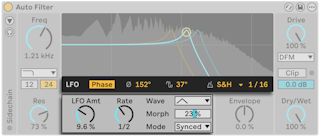
- The left and right channels each get their own LFO. LFO Stereo Mode sets how they differ:
- Phase — same rate, offset by LFO Phase in degrees; 180° puts them fully opposite
- Spin — the two rates are detuned by LFO Spin percent
- Phase 0° or Spin 0% modulates both channels the same
- LFO Phase Offset moves both LFOs' start point; it only works in synced or sixteenth time modes.
- LFO Quantization Mode — Steps splits each cycle into LFO Steps stepped values; S&H quantizes to the beat value in LFO S&H.
- LFO Amt — how much the LFOs move the filter, alongside or instead of the envelope
- Rate — in Hz, seconds (shown as Time), synced divisions or sixteenths, set by Mode
- Wave — Sine, Triangle, Saw, Square, Ramp Up, Ramp Down, Wander, S&H. Spin has no effect with Wander or S&H.
- Morph reshapes the wave; with S&H it becomes Smooth.
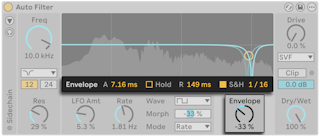
- These controls set how the envelope follower moves the cutoff.
- Envelope Attack — how quickly the envelope follows rising levels; higher values respond more slowly
- Envelope Hold — when on, the attack finishes before the release starts
- Envelope Release — how quickly it follows falling levels; higher values lengthen the decay
- Envelope S&H and Envelope S&H Rate — quantize the envelope to beat values
- Envelope (below the display) — direction and amount of envelope modulation
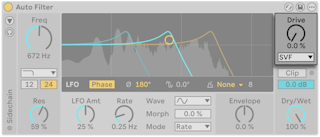
- Drive adds input gain before the filter for saturation; 0% leaves the sound unchanged.
- Filter Circuit models analog filter designs. It applies only to Low-pass, High-pass, Band-pass, Notch and Morph.
- SVF — clean, though it distorts with Drive above zero
- DFM — feeds back more of its distortion; from gentle sweeps to warm drive
- MS2 — Sallen-Key design with soft-clipped resonance, modeled on a well-known Japanese semi-modular monosynth
- PRD — ladder design without resonance limiting, modeled on a vintage American two-oscillator monosynth
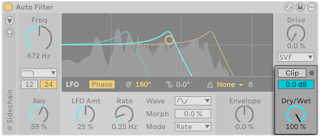
- Clip — soft-clips the output to tame resonant peaks; its LED flashes when clipping
- Output — output level, to make up for loudness changes from Drive
- Dry/Wet — balance of processed and dry signal
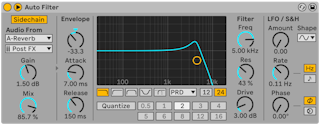

- By default the envelope follower listens to Auto Filter's own input. The Sidechain Section toggle at the top left opens external sidechain controls.
- External turns on the external sidechain; External Source picks the source and External Tapping Point picks Pre FX, Post FX or Post Mixer.
- Mix — 0% uses only the internal signal, 100% only the external one
- SC Gain — sidechain input level; it only affects triggering, not volume
- Sidechain Listen — replaces the output with the sidechain signal for monitoring
- SC Filter limits the sidechain to a frequency range, so Auto Filter reacts only to it.
- Sidechain Filter Frequency sets the cutoff; Type is low-shelf, peak, high-shelf, low-pass, band-pass or high-pass.
- Shelves boost or cut on one side of the cutoff to a level set by Shelf Gain; peak boosts or cuts around the cutoff by Peak Gain.
- Sidechain Filter Q sets the bandwidth.
- The sidechain is summed to mono by default, so both channels get the same envelope. Mono Sidechain in the device's context menu turns that off.