Ableton/Live/UG/27 Clip Envelopes/02 Audio Clip Envelopes/02 Changing Pitch and Tuning per Note
- With Warp on, choose Clip → Transposition and change the pitch of individual notes in a loop while it plays.
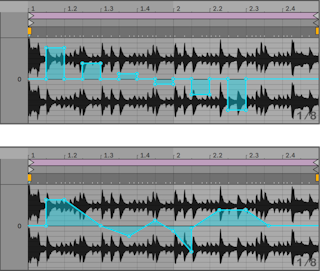
- Draw steps along the grid in Draw Mode, then switch Draw Mode off to move breakpoints and soften the steps into ramps.
- Warp settings decide how closely the envelope is followed: lower Grain Size in Tones or Texture mode, or a smaller Granulation Resolution in Beats mode, for a quicker response.
Shift while drawing or dragging gives finer steps for tuning corrections. Cmd+Option-drag (Mac) / Ctrl+Alt-drag (Windows) scrolls.- The envelope adds to the Transpose control, and the total stays within −48 to +48 semitones.