Ableton/Live/UG/27 Clip Envelopes/02 Audio Clip Envelopes
- With audio effects, clip envelopes make Live a sound design tool: many variations of one clip, from small corrections to unrecognisable new sounds, all in real time.
- Envelopes are computed live and never change the sample on disk, so hundreds of clips can share one sample and all sound different.
- To keep a result as audio, render, resample, or use Consolidate in the Arrangement.
- With Warp on, choose Clip → Transposition and change the pitch of individual notes in a loop while it plays.
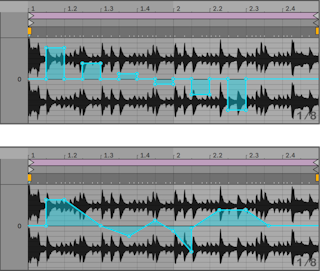
- Draw steps along the grid in Draw Mode, then switch Draw Mode off to move breakpoints and soften the steps into ramps.
- Warp settings decide how closely the envelope is followed: lower Grain Size in Tones or Texture mode, or a smaller Granulation Resolution in Beats mode, for a quicker response.
Shift while drawing or dragging gives finer steps for tuning corrections. Cmd+Option-drag (Mac) / Ctrl+Alt-drag (Windows) scrolls.- The envelope adds to the Transpose control, and the total stays within −48 to +48 semitones.
- Choose Clip → Gain and draw any volume shape onto the sample.
- The envelope is a percentage of the Clip Gain setting, so it can turn notes down to silence but never above the gain slider.
- In Beats warp mode only, Clip → Sample Offset shifts where the clip reads from, which rearranges a rhythmic loop.
- Picture a tape head moved by the envelope: positive values read ahead, negative values read behind. Each vertical grid line is a sixteenth note, from +8 to −8 sixteenths.
- A descending staircase repeats the first step; a smooth downward ramp slows time, with a slurred sound when it is slightly off 45° (try a 1/32 Granulation Resolution).
- Good for quick beat variations; precise cutting and splicing is easier in the Arrangement with Consolidate.
- To hear a clip's envelopes with another sample, select the clip and drag a new sample onto Clip View. All settings and envelopes stay; only the sample changes.