Ableton/Live/UG/26 Automation/09 Additional Tips for Working with Automation/01 Automating the Tempo
26.9.1 Automating the Tempo
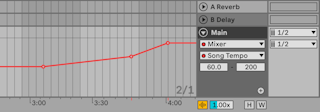
- Tempo can be automated like any control: tempo changes made while recording the Arrangement are saved.
- To see or draw it, turn on Automation Mode and choose Mixer → Song Tempo in the Main track's lane.
- The Tempo Minimum and Maximum sliders set the BPM range shown, which is also the range of a MIDI controller mapped to tempo.