Ableton/Live/UG/26 Automation/09 Additional Tips for Working with Automation
- Tempo automation, locking envelopes to the timeline, and Edit menu commands.
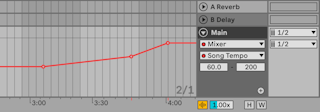
- Tempo can be automated like any control: tempo changes made while recording the Arrangement are saved.
- To see or draw it, turn on Automation Mode and choose Mixer → Song Tempo in the Main track's lane.
- The Tempo Minimum and Maximum sliders set the BPM range shown, which is also the range of a MIDI controller mapped to tempo.
- With a time selection in an automation lane, Cut, Copy, Duplicate and Delete act only on the envelope inside it, leaving clips alone. A selection across several lanes affects all of them.
- Envelope segments can be pasted to a different parameter, with unpredictable results.