Ableton/Live/UG/26 Automation/07 Editing Automation/01 Editing Breakpoints and Segments
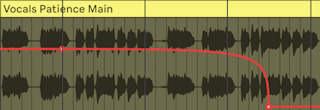
- Drag a breakpoint to move it; a vertical line shows its grid position.
Cmd/Alt bypasses snapping; Shift locks horizontal moves and gives fine vertical control. - Click a breakpoint to delete it; its neighbours join up.
- Drag in the background to select several breakpoints, then drag one to move them all, or Delete from the context menu.
- Drag near a segment to move it, or
Shift-click it, then release Shift and drag. Moving a segment in or out of a time selection adds breakpoints at the selection's edges. - Dropping onto existing breakpoints overwrites them, but only when you release.
Option-drag (Mac) / Alt-drag (Windows) a diagonal segment to curve it; double-click with the same key to straighten it.- Edit Value in the context menu types an exact value; other selected breakpoints move by the same amount.