Ableton/Live/UG/26 Automation/06 Creating Automation Envelopes/03 Inserting Automation Shapes
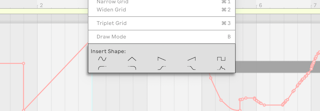
- Shapes from the Envelope Editor's or lane's context menu fill the time selection, or one grid step at the insert marker, scaled to the parameter's range. Useful for rhythmic patterns, swells and builds.
- The top row holds sine, triangle, sawtooth, inverse sawtooth and square; the bottom row holds two sets of ramps and an ADSR.
- Waveforms go in as drawn; ramps connect to the values on either side of the selection, so they look different depending on their surroundings.
- Stepped parameters accept only the square shape.