Ableton/Live/UG/26 Automation/05 Viewing Automation/01 Viewing Automation in Session View
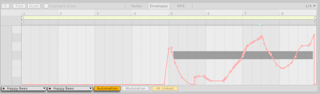
- In Clip View's Envelope Editor, turn on the Automation toggle and pick a device and control in the choosers beside it.
- The Device chooser lists the track's devices, the mixer and MIDI Ctrl (MIDI controller clip envelopes). LEDs mark automated controls and the devices holding them. A control without automation shows as a dashed line at its current value.
- Show Adjusted Envelopes Only shortens the lists to one combined Automated Control chooser; Show All Envelopes brings the full lists back.
- With Clip and Device View stacked, clicking any device or mixer control opens its envelope — unless Show Adjusted Envelopes Only is on and the control has no automation.