Ableton/Live/UG/26 Automation/01 Recording Automation in Session View
- Session View automation can go into Session clips, or into the Arrangement's automation lanes when recording the Session to the Arrangement. Only the second can automate tempo.
- To record into Session clips, turn on Ableton/Live/UI/Control Bar/Button/Automation Arm in the Control Bar and arm the tracks.
- Setting Record Session automation in to All Tracks (Record, Warp & Launch Settings) records into every playing clip, armed or not — for instance adding automation to a MIDI clip without recording notes.
- Press Session Record and move controls. Press it again to stop recording and keep playing, or press Stop to stop both.
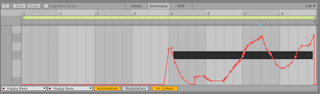
- Edit the result in Clip View's Envelope Editor.
- Copying Session clips into the Arrangement turns their automation into track automation. Recording the Session into the Arrangement captures existing clip automation along with live changes.