Ableton/Live/UG/24 Plug-Ins/03 VST Plug-Ins/01 The VST Plug-In Folder
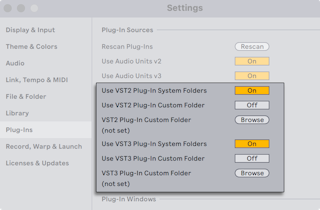
- VST sources must be activated before first use: press Activate in the browser's Plug-Ins panel, or open the Plug-Ins Settings with
Cmd+, (Mac) / Ctrl+, (Windows) and find Plug-In Sources. - Windows: Browse to set the VST Plug-In Custom Folder (Live may already have found it in the registry) and turn on Use VST Plug-In Custom Folder.
- macOS: plug-ins in /Library/Audio/Plug-Ins/VST (home and local) are used when Use VST plug-ins in System Folders is on. A custom folder can be added alongside or instead, with its own on/off option.
- Live scans the chosen folders and their subfolders. Aliases placed in a scanned folder can point to plug-ins elsewhere, even on another drive.
- A plug-in that crashes the scan is reported on the next launch, with the choice to rescan or disable it. One that crashes twice is disabled until reinstalled.