Ableton/Live/UG/21 Comping/06 Creating a Comp
- Press
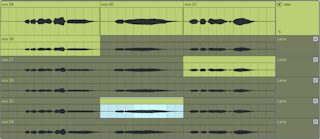
Enter, or use Copy Selection to Main Lane, to copy selected take material to the main lane. - Select clips or a time range and press
Cmd/Ctrl+up/down arrow to swap in the same span from the next or previous non-empty take. On a take lane the selection moves with it. - In Draw Mode, click and drag across a take to copy it to the main lane in one gesture, or click a take to fill a main-lane time selection from it.
- Main-lane clips are independent copies, so either can be edited without changing the other. Take clips edit like any Arrangement clip and can be copied or dragged to Session slots.
- Create Fades on Clip Edges (Record, Warp & Launch Settings) adds 4 ms crossfades between adjacent clips to prevent clicks;
Cmd+Option+F / Ctrl+Alt+F adds them by hand.