Ableton/Live/UG/19 Recording New Clips/03 Recording/02 Recording Into Session Slots
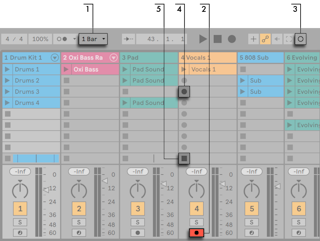
- Set Global Ableton/Live/UI/Control Bar/Menu/Quantization to anything but None so clips are cut on time.
- Arm the tracks; empty slots on armed tracks show Clip Record buttons.
- Session Record records into the selected scene on every armed track; the new clips' launch buttons turn red. Press it again to switch straight to looped playback.
- Or click one Clip Record button to record a single slot, and press the clip's Launch button to loop it.
- A slot's Clip Stop button, or the Control Bar's Stop, stops the clip.
- The New button stops clips on armed tracks and selects a scene ready for a new take, adding a scene if needed. It only appears in Key Map and MIDI Map modes, for mapping.
- Launching a scene doesn't record into its empty armed slots unless Start Recording on Scene Launch is on in the Record, Warp & Launch Settings.
