Ableton/Live/UG/19 Recording New Clips/03 Recording/01 Recording Into the Arrangement
19.3.1 Recording Into the Arrangement
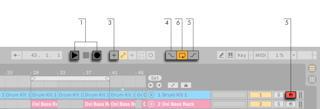
- Ableton/Live/UI/Control Bar/Button/Arrangement Record starts recording. With Start Playback with Record on (Record, Warp & Launch Settings) it starts at once; with it off, recording waits for Play or a clip launch.
Shift-click does the opposite of the setting. - Every armed track gets a new clip.
- With MIDI Arrangement Overdub on, new MIDI clips combine what was already in the track with the new input. Audio tracks don't overdub.
- Ableton/Live/UI/Control Bar/Switch/Punch-In blocks recording before the Arrangement Loop's start, which protects earlier material and gives a pre-roll. Ableton/Live/UI/Control Bar/Switch/Punch-Out stops it after the loop's end.
- Recording into the Ableton/Live/UI/Control Bar/Toggle/Arrangement Loop keeps every pass. Undo repeatedly to step back through them, or open the clip: the sample holds all passes, the loop brace marks the last, and moving the markers left plays earlier ones.
- See also Ableton/Arrangement View/Q/Can I record in Arrangement View while playing Session View clips?