Ableton/Live/UG/19 Recording New Clips/02 Arming (Record-Enabling) Tracks
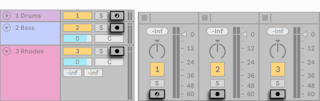
- Click a track's Arm button to record-enable it. Session and Arrangement share tracks, so either view works.
- Armed tracks are monitored by default ("auto-monitoring"), so you hear the input through the device chain.
- Arming a MIDI track locks a natively supported control surface to the track's instrument.
- Arming one track disarms the others unless you hold
Cmd (Mac) / Ctrl (Windows) or several tracks are selected. Arming also selects the track, showing its devices.