Ableton/Live/UG/14 Grooves/01 Groove Pool
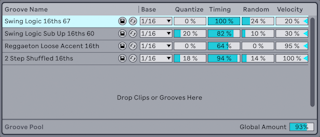
- The Groove Pool holds every groove in use or loaded by double-clicking it in the browser. Grooves not used by any clip show greyed-out parameters.
- Open it from the browser's view control menu, or with
Cmd+Option+6 (Mac) / Ctrl+Alt+6 (Windows). - Each groove in the pool has buttons to save and hot-swap it, and these parameters, which change playback in real time:
- Base — the note grid the groove is measured against, such as 1/4 or 1/8. Groove notes that fall on that grid don't move your notes.
- Quantize — straight quantization applied before the groove: 100% snaps to the Base grid, 0% leaves notes where they were.
- Timing — how strongly the groove's timing moves the clip.
- Random — random timing offsets, different for each voice; small amounts loosen tightly quantized loops.
- Velocity — how much the groove's velocities affect the clip, from −100 to +100. Negative values invert loud and quiet.
- Global Amount — scales Timing, Random and Velocity for every groove, up to 130%. It also appears in the Control Bar once any clip has a groove.
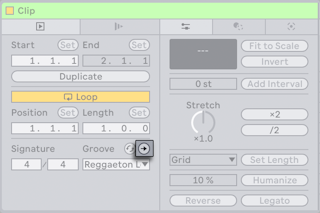
- Commit, above the Clip Groove chooser, writes the groove into the clip — moving MIDI notes, or adding Warp Markers to audio — and then sets the clip's groove to None.